
Experts Matter. Find Yours.
Connect for media, speaking, professional opportunities & more.

Seniors and AI (Part 2): Exercise Caution
If you haven't read Seniors and AI (Part 1) What Could Possibly Go Wrong?, catch up here. My friend Gloria told me she asked her AI assistant what to do about a “sore knee,” and it suggested she might be experiencing “symptoms consistent with early-stage gout, possible DVT, or referred pain from lumbar stenosis.” Gloria is 74, lives alone, and spent the next three hours convinced she was dying. She was not. She had slept on the couch in an awkward position. This is Part 2 of our look at Seniors and AI. If Part 1 was about the laughs, Part 2 is where we put on our reading glasses and pay attention. When technology moves from ordering groceries to offering medical advice or emotional support, the stakes get considerably higher than an accidental pineapple on your pizza. AI and Medical Advice: The Good, the Bad, and the “You Googled What?” Let’s give credit where it’s due. AI genuinely helps in healthcare in meaningful ways. It’s available at 2 AM without judgment. It translates medical jargon into plain English. It can help you walk into a doctor’s appointment with better questions instead of the usual panicked stare. But here’s what it cannot do: see you, touch you, or notice you’re limping. It can’t smell an infection, hear the wheeze in your chest, or detect the subtle signs that something is wrong. At its core, it is an elaborate and very polite Google search. Not a doctor. Takita et al. (2025), in a systematic review and meta-analysis published in Digital Medicine, found that the overall diagnostic accuracy of generative AI models is about 52 percent. Read that again. Fifty-two percent. Suitable for a second opinion, nowhere near sufficient to replace an experienced clinician. And yet, we hear a confident-sounding response and think, “Well, the computer said so.” Confidence and correctness are not the same thing, a lesson most of us learned the hard way in our thirties. When AI Is Safe (and When It Is Decidedly Not) Go ahead and ask AI about: What does that lab term on your bloodwork actually mean Common side effects of medications you’re already taking Questions to bring to your next appointment General information about a health condition Do not ask AI about: Anything you’d describe as “just making sure it’s not something bad”? Chest pain, sudden numbness, or anything that begins with “I’ve never felt this before” Whether to stop taking a medication Whether your symptoms are serious enough to go to the ER Think of AI as the helpful intern, not the chief medical officer. You’d let the intern look something up for you, but you wouldn’t let the intern prescribe your blood pressure medication. Bottom line: if you wouldn’t trust your toaster to measure your blood pressure, don’t trust a chatbot to diagnose your heart. AI Therapy: Comfort or Catastrophe? Mental health chatbots promise empathy. Let’s be precise about what that means: they simulate compassion, not feel it. There is a difference, and it matters. A Stanford University study (Moore & Haber, 2025) warns that therapy chatbots can reinforce stigma or provide genuinely unsafe responses. They can’t detect tone, see tears, read a room, or call for help when things turn dark. This is especially concerning for older adults. Loneliness and depression are common among seniors and are routinely dismissed as “just slowing down” or “getting older.” That’s not aging. Those are invisible illnesses that deserve real attention and real human connection. The Signs We Miss According to the National Institute on Ageing’s 2025 Ageing in Canada Survey, 57 percent of Canadians over 50 report feeling somewhat or very lonely, and 43 percent are at risk of social isolation. These figures haven’t changed since 2022. This is not a fringe problem. It is a quiet epidemic hiding in plain sight. Watch for these signs in yourself and in the people you love: Pulling back from activities they once loved Sleeping too much or not nearly enough Loss of appetite or unexplained weight changes Talking nonstop when the company finally arrives (that’s hunger or severe loneliness, not chattiness) Inventing reasons to call or visit Self-deprecating humour that feels a little too real. Here’s a small but important piece of advice: don’t ask, “Are you lonely?” You’ll get a cheerful “Of course not!” Pride and independence run deep, especially among a generation that survived things we can’t imagine. Instead, act as if. Drop by with coffee. Ask for help with something they are well versed in. Bring the dog. Go for a walk. Sit quietly and watch a show together. Share a meal. Loneliness doesn’t always need a conversation. Sometimes it just needs to know someone showed up. What Your Elder Is Thinking (But Will Never Tell You) Tread carefully here. These thoughts tend to live in the quiet spaces between sentences, felt but rarely spoken. How much time do I have? Have I done enough? Will my money run out before I do? Will anyone remember me? Do I still matter? Why do I feel so sad? Why are my friends getting sick and slipping away? Will I get sick? Who will look after me? Do my children know I love them? What if I start to forget? The creeping fear of losing names, faces, the stories that make life feel like mine. Am I a burden? (This one usually hides behind a joke.) What if my best days are already behind me? Some of these will surprise you. Some won’t. Some will make you want to pick up the phone right now. That’s the right instinct. You don’t need to fix these feelings. Sometimes, sitting quietly with someone in the silence between their words is the most healing thing you can offer. For the Family: What to Watch For and What to Do A quick note for the kids, grandkids, nieces, nephews, and anyone who forwards funny videos to their grandparents: your elders are going to experiment with AI. Probably the same way you experimented with your first beer or a regrettable tattoo: curious, enthusiastic, and occasionally overconfident. Watch for these warning signs: Increasing withdrawal from real-world activities and people Confusion about what is real versus AI-generated Replacing actual conversations with chatbot exchanges Acting on AI medical or financial advice without verifying it with a professional Being secretive or evasive about what they’re doing online Here is what you can do: Connect regularly. Ask what they’re learning or laughing about. Create opportunities for in-person time. FaceTime counts in a pinch, but in-person is irreplaceable. Know when to call the doctor. Know when all they need is your time. Don’t lecture. Don’t infantilize. Just stay connected. The best firewall against the risks of AI is not better technology. It’s better relationships. The Real Threat: Replacing Connection Here is the uncomfortable truth. AI is tempting. It’s always available, never interrupts, doesn’t judge, and responds instantly without getting distracted by its own problems. For someone who feels lonely, invisible, or like a burden, that can feel like a lifeline. But it’s a false one. AI cannot hold your hand or share a meal. It can’t laugh at your jokes in a way that truly counts. It cannot offer the warmth of human presence, which is what we need most, especially as we age. The danger isn’t primarily that AI will give bad medical advice, though it might. The danger is that it will replace human connection altogether. And that is a problem no algorithm can solve. CTRL ALT DEL: Now Go Call Someone AI is a tool. Part marvel, part mistake, and entirely dependent on who holds it. Use it wisely. Enjoy the entertainment. Stay curious. And remember who is actually in charge. Technology will keep getting smarter. It will not get warmer. It will not hear the sound of your laugh, remember the story you’ve told seventeen times, or show up at the door with soup when you’re not feeling well. That is still us. That will always be us. So yes, let Gloria ask her AI about her knee. But let’s also make sure someone calls Gloria on Tuesday. Key Takeaways Use AI for information, not diagnosis or treatment. Stay alert to signs of loneliness in yourself and in the people you love. Stay genuinely connected with older family members and friends. When in doubt, choose the human over the algorithm. The greatest upgrade to AI isn’t a newer version. It’s showing up. Sue Don't Retire...ReWire! My Book is Now Available for Pre-Order I hope you will consider pre-ordering a copy of Your Retirement Reset for you, a friend or loved one. It's available September 8, 2026 - You can now order on the ECW Press site here. And if you love supporting Canadian booksellers, please also check with your local independent bookstore. Most can easily order it for you.



How the Class of 2026 can keep resumes out of the digital black hole
Students set to graduate this May are entering a job market where the rules of engagement are being rewritten in real-time. AI is both friend and foe, and ghosting has become the norm. University of Delaware career expert Jill Panté shares how college students can navigate these challenges in a rapidly shifting economy. Panté, director of the Lerner Career Services Center at UD, can apply her expertise to the following: The AI recruitment gap • How to prevent resumes from falling into the "digital black hole" of automated tracking systems. • Current recruitment in 2026 is heavily filtered by AI. If resumes don't mirror the language of the job description, a human might never even see it. • In 2026, AI is the gatekeeper. Students who aren’t using AI for assistance are working twice as hard for half the results. However, the goal is to use it as a co-pilot, not an autopilot. Beat the bots (tailor your content) • Use tools like Resume Worded or Generative AI like Microsoft Co-Pilot or Gemini to see how resumes stack up against specific job postings. • It is better to send five highly tailored, thoughtful applications than 50 generic ones that get auto-rejected by an algorithm. • Use AI to run a mock interview based on the job description and company. The "hidden” job market • If a "job search" consists solely of clicking "Easy Apply" on LinkedIn for six hours a day, it’s not searching; it’s just doom-scrolling with a resume. Roughly 80% of your time should be spent talking to humans. The other 20% should be spent on applications and research. • Find the recruiter or a department head on LinkedIn. Send a brief (2-3 sentence) note reiterating your interest. • Leverage alumni networks through LinkedIn. Narrative branding • Especially for Gen Z: Hiring managers don't just want to know what you did; they want to know the impact you made. • Instead of saying "Responsible for social media,” say "Increased engagement by 40% over 3 months by implementing a new video strategy." • Always lead with results (LinkedIn, resume, Interviews) to showcase the value you bring. Workforce anxiety • Managing the mental toll of the modern, high-speed job search and the professional "ghosting" epidemic. • Establish a personal "Board of Directors" to provide a balance of support, accountability and feedback. • Maintain momentum by volunteering, attending local networking events and learning new skills on platforms like LinkedIn Learning and Coursera. To reach Jill Panté directly and arrange an interview, visit her profile and click on the “contact” button.



From “Covfefe” to commanding the algorithm: How Trump turned memes into political power
A recent analysis by CNN traces how Donald Trump’s relationship with internet culture has evolved from accidental viral moments into a deliberate, highly effective communications strategy. The article highlights how memes, once unpredictable and grassroots, have become a central tool in shaping political narratives, driving engagement and bypassing traditional media channels. Some of the great insight and perspective in the article comes from Dannagal Young, whose insights help explain why this strategy resonates so strongly. Young emphasizes that memes act as powerful emotional and cultural signals, allowing political messages to travel quickly while reinforcing identity and belief among audiences. What began with moments of internet spontaneity has matured into a calculated approach that blends humor, provocation and simplicity to dominate attention in a crowded digital landscape. “The entire ethos and aesthetic of this administration is spectacle and subversion of norms,” Young said. “You don’t do that through deliberation or argument, but through symbols.” Her perspective, as presented in the CNN article, underscores a broader shift: political influence is increasingly shaped by content that feels native to the internet, where relatability, repetition and shareability often matter more than traditional policy-driven messaging. ABOUT DANNAGAL G. YOUNG Dannagal G. Young is a Professor of Communication and Political Science at the University of Delaware where she studies the content, audience and effects of nontraditional political information. She has published over sixty academic articles and book chapters on the content, psychology and effects of political information, satire and misinformation.

Seniors and AI: What Could Possibly Go Wrong?
Let’s be honest: we’ve weathered every tech wave they’ve thrown our way. Rotary phones. Dial-up internet. The BlackBerry. And somehow, we’ve made it to AI. The robots know more about our shopping habits than our spouses do—and honestly, they’re better listeners. We’ve Survived Every Tech Wave. AI Is Just the Next One. Remember when the internet first emerged, and everyone claimed it would never take off? Shopping online was considered silly ("Who would buy shoes without trying them on?"), And email sounded like something only NASA engineers would use. Fast forward a few decades, and now you can't even renew a driver's licence without the internet. So much for "it'll never last." It all began innocently enough. The first cordless phone was freedom on a frequency—you could step outside, yell "Can you hear me now?" and feel unstoppable. Then came remote controls, launching the golden era of couch-based cardio: jumping up every five minutes to find the one that actually worked. (Still missing: one VCR remote, circa 1987.) Next came AOL. "You've got mail!" was our first digital dopamine hit. Then the BlackBerry arrived—part phone, part pager, part fashion statement. It was heavy, expensive, and glorious. Until, like a hot potato, we all dropped it for the iPhone—sleeker, lighter, and small enough to fit in yoga pants. The iPod Nano followed. Goodbye radios, hello playlists! From there came Google, streaming, apps, and clouds (the digital kind, not the ones that ruin golf). And now… drumroll, please… Artificial Intelligence. The "It'll Never Last" File: Greatest Misses Edition We've encountered the skeptics before: • The Internet: "No one will use it." • Online Shopping: "People won't buy shoes sight unseen." • Email: "Who needs digital letters?" • Voice Assistants: "Talking to a speaker will freak people out." • AI: "It's just hype—like the Segway for brains." Well, the Segway is still technically around, but you're not riding one to the golf course. Meanwhile, AI is everywhere—and yes, seniors are joining the party. AI: The Latest "Fad" That Isn't If you think AI is a passing craze, you probably also dismissed online shopping and email. (Confession: I once thought, "Who would ever enter their credit card number online?") But AI isn't a gadget—it's the next era. As permanent as gravity, and just as invisible until it knocks something over. Use of generative AI among older adults throughout North America is growing. A Leger Research study revealed that 1 in 3 Canadians 55+ have tried an AI tool. We can ignore it, "poo-poo" it, or embrace it. But always remember: Resisting progress will not slow it down one byte. Why This Time Is Different Here's the twist: today's seniors aren't like our parents' generation. We're Boomers with bandwidth. We were the first to type with our thumbs, track our steps before it was trendy, and FaceTime the grandkids instead of mailing Polaroids. We've earned our tech credentials. Now it's time to flex them in the AI era. Seniors Meet AI: A Beautiful Disaster AI promised to make life easier. Instead, for many seniors, it's like adopting a mischievous grandchild who never listens and occasionally orders you twelve pineapples by accident. Let's be honest—we've all had those moments. Voice Assistants: The Frenemies "Alexa, play Staying Alive." "Calling 911. You appear to be in distress." "Siri, remind me to take my pill at 8." "Texting Phil at 8." "Hey Siri, stop listening." Silence. "Hey Siri, play jazz music." Still silence. (Give it a minute… you'll get it.) These so-called "assistants" are like toddlers with Wi-Fi—they only hear half of what you say, and always the half that causes chaos. The Sitcom Nobody Asked For Seniors using AI might just be the world's best sitcom waiting to happen: • Episode 1: ChatGPT Writes My Will (and Leaves Everything to Wi-Fi) • Episode 2: Siri Joins My Book Club and Never Stops Talking • Episode 3: I Asked Alexa to Play Jazz, and She Ordered a Jacuzzi Coming soon to streaming services everywhere—as soon as we find the remote. Texting While Senior: A New Dialect Emerges If you think AI is confusing, try texting with seniors. Somewhere between autocorrect and abbreviations, a new language has evolved—part English, part comedy special: BTW – Bring The Wheelchair ROFL... CGU – Rolling On The Floor Laughing... Can't Get Up LOL – Living On Lipitor BYOT – Bring Your Own Teeth TGIF – Thank Goodness It's Four (Early Bird Special) FWB – Friend With Beta-Blockers TTYL – Talk To You Louder LMDO – Laughing My Dentures Out GOML – Get Off My Lawn Honestly, AI could spend years decoding that list and still ask, "Did you mean BYOB?" "But What About Privacy?" (Spoiler: That Ship Has Sailed) Ah yes, the Privacy Protectors—those well-meaning friends who whisper, "Don't use AI, they're stealing your identity!" Spoiler alert: that ship already sailed. Siri and Alexa have been eavesdropping for years. Google knows where you've been, what you've read, and that you googled "how to delete Google history." Uber keeps a record of every trip you've ever taken—yes, even that midnight McDonald's run—and there's no "forget" button. Most of us have already traded privacy for utility. And honestly? It's not always a bad deal. I'm happy to share a few megabytes of data if Apple can tell me where I parked in the underground garage with seventeen identical "P2" levels. That's not a conspiracy—that's a lifesaver. AI saves time, surfaces better options we didn't know existed, and delivers instant answers. No more hunting for the manual to your smoke detector—just snap a photo, and AI tells you exactly which button to push (and which one to avoid). We're not losing control; we're gaining convenience. And at this stage of life, that's worth more than a few anonymous data points. Ways Seniors Can Actually Use AI (and Enjoy It) AI tools are making daily life easier for older adults in practical, accessible ways. Here's how you can put them to work: The “Start Here” Ladder: Build Your AI Confidence One Rung at a Time Nobody learns to swim by jumping into the deep end. AI is the same. The trick isn’t to master everything at once—it’s to start somewhere low-stakes, build a little confidence, and move up when you’re ready. Here’s a simple progression that works: Level 1: Voice Assistants Risk Level: Minimal Fun Level: Surprisingly High ------------------- Start here if you haven’t already. Ask Alexa or Siri to set a timer, play music, check the weather, or settle a dinner-table argument. No typing required. Level 2: AI Chat Tools Risk Level: Low (with privacy settings activated) Usefulness Level: Eye-Opening ------------------- This is the “brilliant friend who knows everything” rung. Tools like ChatGPT or Google Gemini are free to use and can answer any question—no judgment, no wait times, no office hours. Try drafting a birthday message. Ask it to explain a medical term your doctor used. Get it to suggest a one-week meal plan. You type, it answers. Think of it as Google, but one that actually understands your question. A Note of Caution (Read This): Before you type anything personal into an AI app, go into the app’s privacy settings and switch off chat history/training so you don’t expose personal information. ChatGPT users can navigate to Settings > Data Controls and turn off "Improve the model for everyone". This prevents your conversations from being used to train future models. For extra privacy, disable "Chat History & Training," turn off memory features, or use the temporary chat feature. Level 3: Health and Wellness Wearables Risk Level: Low Payoff : Potentially Life-Saving ------------------- An Apple Watch or Fitbit isn’t simply a fancy step counter. These devices now detect irregular heart rhythms, monitor blood oxygen levels, track sleep quality, and—crucially—detect falls and automatically alert emergency contacts. For anyone living independently, that last feature alone makes it a worthwhile investment. You don’t need to know exactly how it works; just wear it. Level 4: Smart Home Tools Risk Level: Medium Payoff: You’ll Wonder How You Managed ------------------- Smart thermostats, video doorbells, voice-controlled lighting—these are AI tools you set up once and forget. The real win here is independence. Being able to control your home environment with your voice, check who’s at the door from your phone, or have the heat adjust automatically before you wake up: these aren’t luxuries. For many of us, they’re what make staying in our own homes longer a real and practical option. Level 5: AI-Assisted Financial Tools Risk Level: Higher. Stakes Level: Real. So Tread Carefully and Deliberately ------------------- This level is for when you’re comfortable and curious—not before. AI can now help you understand tax documents, summarize financial statements, compare mortgage products, and even flag unusual account activity. These tools are genuinely powerful. But they work best alongside a trusted human advisor, not instead of one. Think of AI as the research assistant who preps the questions. Your financial advisor is still the one who answers them. The key is this: you don’t have to climb the whole ladder today. Pick one level. Try it for a week. Laugh when it goes sideways. Then decide if you want to go higher. Writing & Editing: Draft emails, thank-you notes, or letters with the right tone—ChatGPT handles over 1 million daily health-related queries from seniors, including help preparing questions for doctor visits Travel Planning: Find flights, plan itineraries, and even pack your suitcase virtually Financial Education: Ask about investments or taxes—AI explains without the jargon Health & Fitness: Wearable devices like Apple Watch and Fitbit track exercise, monitor heart rate, detect falls, and can notify help if you're in an accident Smart Home Control: Voice-activated systems can adjust temperature, turn lights on and off, unlock doors, and control security—all with simple voice commands Cooking: "AI, make a meal with tuna, yogurt, and hope" Entertainment: Jokes, playlists, stories, or party ideas Learning: Teach yourself a language, an instrument, or how to fix the Wi-Fi (again) Want to get started? OATS published "AI for Older Adults," a comprehensive guide covering health, finance, and lifestyle applications specifically for seniors. It's available at oats.org. The Serious Bit: AI and Your Portfolio Here’s where I put on my serious hat for a moment. The U.S. stock market is currently top-heavy with AI darlings—Nvidia, Microsoft, Alphabet, and Meta. Great companies. Exciting times. But retirement portfolios are not the place for a single-themed bet. If your retirement savings are overloaded with AI stocks, a correction could make your portfolio look like your Fitbit step count on a February long weekend. Diversify. Always. Love tech. Just don’t go steady with it. For more on this topic, check out Part 1 of my post: The Retirees' Guide to Market Volatility: Building Your Financial Safety Net Embrace AI, Don't Fear It AI is here to stay. Think of it as your digital assistant, not your replacement. Our generation has lived through it all: dial-up, disco, dot-com booms, and Bitcoin. If anyone can handle the rise of the machines, it's us. We figured out VCRs (eventually), navigated online banking, and mastered Zoom backgrounds (some better than others). And no, blurred does not count as a background. So fire up your curiosity. Try ChatGPT to plan your next vacation, use Google Gemini to get thoughtful answers to complex questions, or tell Alexa to crack a joke. (She's still learning… but she's improving.) We’ve adapted before. We’ll adapt again. That’s actually what we do. One baffling software update at a time. And here’s what no algorithm will ever replicate: Us. Our humour. Our resilience. The comedy gold of a pocket-dial to our X at 1am. The triumph of finding our reading glasses—while wearing them. AI is smart. But we’re wiser. And that still counts for a lot. So, here's the deal: AI can predict the stock market, diagnose your rash, and write a sonnet in seventeen seconds. But It still can't find your car keys, remember why it walked into the kitchen, or laugh until it snorts at its own joke. We've survived disco, dial-up, the dot-com crash, and that one Zoom call where someone didn't realize their camera was on in the bathroom. We will absolutely survive this, too. AI isn’t here to replace us; it’s here to keep up with us. And frankly, after decades of dealing with actual humans, a very smart, endlessly patient, never-hangry assistant sounds like an upgrade. So, when the robots eventually do take over, they'll need someone to tell them to slow down, dress properly, and call their mother. That's where we come in. Same as it ever was. One baffling software update at a time. Need more guidance? Here are some helpful resources: • AARP's 2025 Tech Trends Report – Research on how older adults are using technology • Bethesda Health Group's AI Guide for Seniors – Practical everyday applications • Ultimate Senior Resource: Top 10 AI Tools – Detailed reviews of the best AI tools for older adults Don't Retire...ReWire! Sue Want more of this? Subscribe for weekly doses of retirement reality—no golf-cart clichés, no sunset stock photos, just straight talk about staying Hip, Fit & Financially Free.
The Double-Edged Scroll: Why Passive Screen Time Drains You More Than Active Use
Most conversations about “screen time” focus on hours. But newer research and what clinicians see in practice suggest how you use your phone may matter as much as how much you use it. A 2024 meta-analysis of 141 studies on active vs passive social media use found that, overall, effects are small, but there is a pattern: passive use (just scrolling and watching) is more consistently associated with worse emotional outcomes, while some forms of active use (commenting, messaging, posting) show small links to greater wellbeing and online social support. (OUP Academic) Other work from Frontiers in Psychology suggests that the emotional impact of passive use depends heavily on how you feel about the content: when it triggers envy, comparison or negativity, mental ill-being goes up; when it’s genuinely positive, the effect can be neutral or even slightly protective for some users. (Frontiers) Reviews also point to upward social comparison, FOMO and rumination as key pathways linking passive browsing to lower wellbeing. (ScienceDirect) Psychotherapist Harshi Sritharan, MSW, RSW works with teens and adults who feel “wiped out” by their feeds and draws a sharp line between passive and active tech use: “Don’t do passive tech use — that doom scrolling, or content just being thrown at you,” she says. “I want people to engage in active tech use. Go and search something up, choose the long-form video you actually want, talk to your friends. Don’t let the app decide everything you see — especially for kids, who are getting content they’re not ready for and didn’t sign up for.” She notes that many of her clients describe feeling “numb, anxious or wired” after long passive sessions, a sign that their nervous system is being pulled around by unpredictable, emotionally loaded content rather than chosen experiences. She also discussed the short term recall related to scrolling: "Some of my clients can't even remember what content they consumed right after scrolling. However, we know that what we pay attention to and what we show our brains has an impact on our thoughts, mindset, feelings and overall internal world." Offline.now founder Eli Singer frames this as a design problem, not a moral failing. The platform’s research shows people already spend about 10 of their 16 waking hours on screens; the realistic goal is to upgrade some of that time, not pretend we can all go offline. His advice: instead of vowing to “get off your phone,” start by swapping just 20 minutes a day from passive to active use; for example, messaging a friend to meet up, learning something specific, or planning an offline activity. “When people tell us they feel overwhelmed by their screen habits, it’s not laziness, it’s a crisis of confidence,” Singer says. “We don’t need perfect digital detoxes. We need small, winnable shifts, like taking one block of passive scrolling and turning it into something you actually chose.” For journalists, the story isn’t simply “screens are bad.” It’s that passive, algorithm-driven scrolling is where comparison, FOMO and emotional overload tend to pile up and that helping people change how they use their devices may be more realistic, and more effective, than focusing on raw minutes alone. Featured Experts Harshi Sritharan, MSW, RSW – Psychotherapist specializing in ADHD, anxiety, insomnia and digital dependency. She helps teens and adults understand how doomscrolling and passive feeds hijack dopamine and mood, and teaches practical shifts toward more intentional, “active” tech use. Eli Singer – Founder of Offline.now and author of Offline.now: A Practical Guide to Healthy Digital Balance. He brings proprietary data on digital overwhelm and the “confidence gap,” and shows how 20-minute “micro-wins” like upgrading one chunk of passive screen time can change people’s relationship with their phones without extreme detoxes. Expert interviews can be arranged through the Offline.now media team.


Tracking rain patterns will improve hurricane forecasting, UF researcher finds
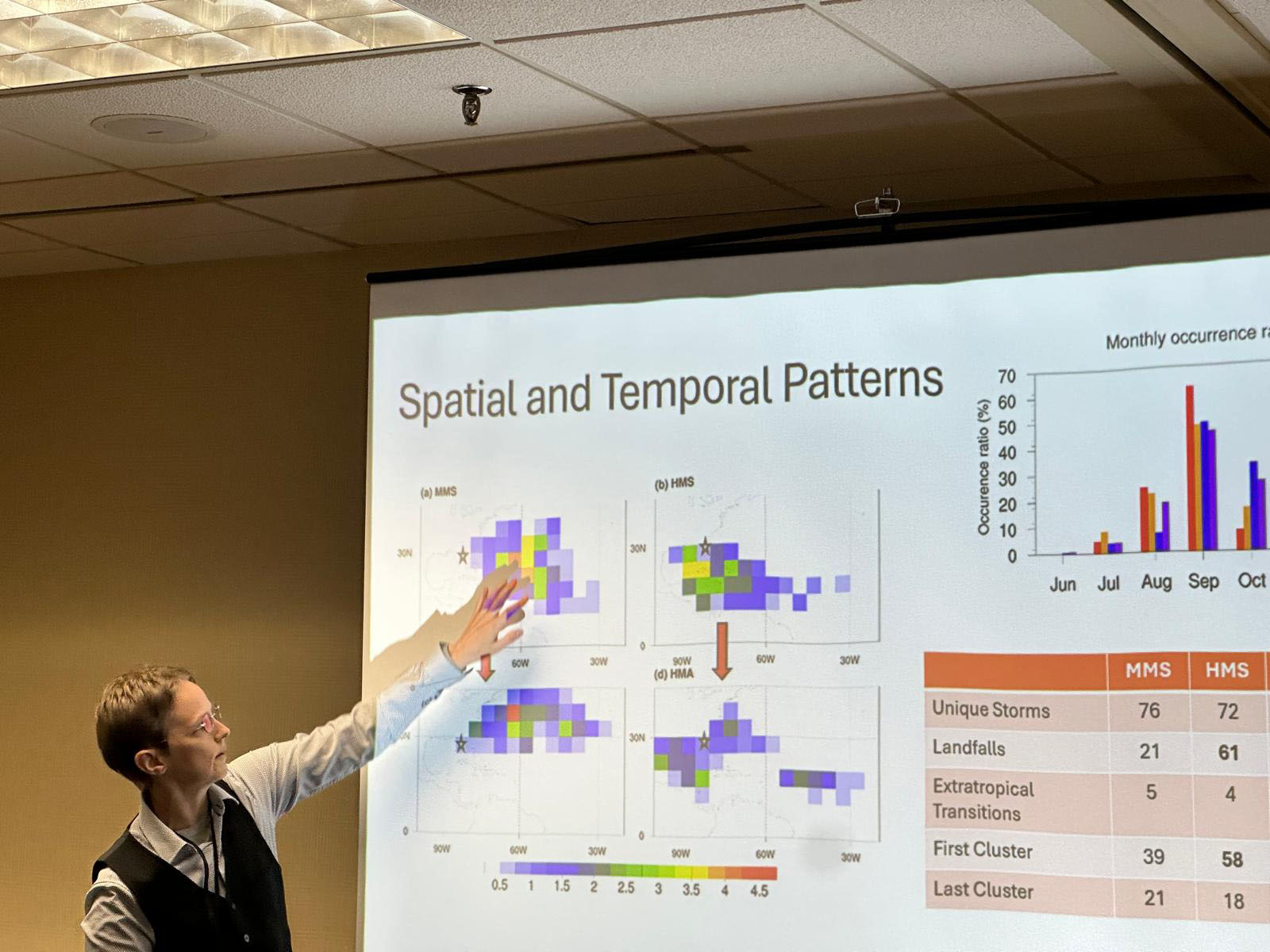
Studying the precipitation patterns in hurricanes may be key to predicting future storm patterns and their potential strength, a University of Florida researcher has found. Supported by a four-year, $212,000 grant from the National Science Foundation, Professor of Geography Corene Matyas, Ph.D. has identified the patterns of rain rates within storms and studied the moisture surrounding these storms. “We are hoping that, if we have a better prediction of moisture availability, that might help us forecast rain events with greater accuracy,” Matyas said. “The more we know about how storms develop, the more we can predict their path and magnitude.” The ideal stage for the perfect storm The potential for devastating high winds, storm surge and flooding poses an annual threat to Florida and its residents. With 1,350 miles of coastline and relatively flat geography that juts out to separate the warm waters of the southeast Atlantic and the Gulf, Florida creates the ideal stage for the perfect storm. Last year broke records with 18 named storms, including 11 hurricanes in the Atlantic basin and three major hurricanes making landfall along Florida’s coast. Early predictions are crucial to hurricane preparedness, allowing for increased response time and resource allocation, and hurricane modeling is essential for understanding these somewhat unpredictable storms. Advances in technology, data collection and the use of artificial intelligence in hurricane modeling have significantly impacted the ability to predict a storm’s path and strength more accurately. Artificial intelligence helps researchers understand hurricanes Matyas has completed two studies on this topic. The first study processed 12,000 images of rain rates from tropical storms and hurricanes in the Atlantic, using a machine learning algorithm called a convolutional autoencoder. Similar in use to image recognition software, the encoder broke the rain rate images down and simplified the patterns. Six main types, or clusters, of rainfall patterns for tropical cyclones were identified. At a presentation of the work to forecasters at the National Weather Service office in Jacksonville, the forecasters confirmed that one of the patterns matches what they typically see when late-season storms make landfall over Florida’s Gulf Coast. The second study used the autoencoder to process 4,600 images that represent the amount of moisture in the atmosphere extending 1,000 kilometers away from each hurricane. “We looked for commonalities in the patterns and found four dominant patterns of moisture that accompany Atlantic basin hurricanes,” Matyas said. “We found the biggest storms with the most moisture make the most landfalls, typically in the Caribbean and even in southern Florida. They also have a large moisture pool, giving them a bigger chance of heavy rainfall.” According to Matyas, three of the moisture patterns found in the second study were strikingly like those found in the earlier study that used fewer observations in a statistical analysis. With this use of AI, researchers can now recognize and understand these moisture patterns better, which can improve predictions about a storm’s intensity, its size and the amount of rainfall that will result from it. Early, accurate storm predictions allow Floridians time to prepare Rapid intensification – when, in a 24-hour period, a storm experiences a sudden drop in pressure and a dramatic increase in wind speed – creates much more of a challenge for forecasters. “We tend to boil down a hurricane to a set of coordinates which track the middle of a storm,” Matyas said. “And the fastest winds do focus there, but the moisture gets pulled from thousands of kilometers away and the system forces the moisture up. That moisture must go somewhere. So, the outer edges of the storm need to be understood more as well.” Matyas hopes these studies will help scientists classify rain patterns more accurately and consistently. Continued funding for research at public universities from federal agencies, such as the National Science Foundation and the National Oceanic and Atmospheric Administration, is essential for helping researchers develop tools to detect and predict severe weather events. Matyas is one of two UF faculty members among 18 national researchers named to the 2025 class of fellows by the American Association of Geographers. Matyas and UF Geography Department Chair Jane Southworth, Ph.D. were honored by the organization for their contributions in biogeography, geospatial analytics, soil science, community geography, climatology and other areas related to geography. “I look forward to this opportunity to contribute to the mission of the AAG in a more formal capacity, continuing to research how weather shapes our spaces and share knowledge of earth systems beyond the classroom and the written word to promote an inclusive society,” Matyas said.



AI-driven software is 96% accurate at diagnosing Parkinson's
Existing research indicates that the accuracy of a Parkinson’s disease diagnosis hovers between 55% and 78% in the first five years of assessment. That’s partly because Parkinson’s sibling movement disorders share similarities, sometimes making a definitive diagnosis initially difficult. Although Parkinson’s disease is a well-recognized illness, the term can refer to a variety of conditions, ranging from idiopathic Parkinson’s, the most common type, to other movement disorders like multiple system atrophy Parkinsonian variant and progressive supranuclear palsy. Each shares motor and nonmotor features, like changes in gait — but possess a distinct pathology and prognosis. Roughly one in four patients, or even one in two patients, is misdiagnosed. Now, researchers at the University of Florida and the UF Health Norman Fixel Institute for Neurological Diseases have developed a new kind of software that will help clinicians differentially diagnose Parkinson’s disease and related conditions, reducing diagnostic time and increasing precision beyond 96%. The study was published recently in JAMA Neurology and was funded by the National Institutes of Health. “In many cases, MRI manufacturers don’t communicate with each other due to marketplace competition,” said David Vaillancourt, Ph.D., chair and a professor in the UF Department of Applied Physiology and Kinesiology. “They all have their own software and their own sequences. Here, we’ve developed novel software that works across all of them.” Although there is no substitute for the human element of diagnosis, even the most experienced physicians who specialize in movement disorder diagnoses can benefit from a tool to increase diagnostic efficacy between different disorders, Vaillancourt said. The software, Automated Imaging Differentiation for Parkinsonism, or AIDP, is an automated MRI processing and machine learning software that features a noninvasive biomarker technique. Using diffusion-weighted MRI, which measures how water molecules diffuse in the brain, the team can identify where neurodegeneration is occurring. Then, the machine learning algorithm, rigorously tested against in-person clinic diagnoses, analyzes the brain scan and provides the clinician with the results, indicating one of the different types of Parkinson’s. The study was conducted across 21 sites, 19 of them in the United States and two in Canada. “This is an instance where the innovation between technology and artificial intelligence has been proven to enhance diagnostic precision, allowing us the opportunity to further improve treatment for patients with Parkinson’s disease,” said Michael Okun, M.D., medical adviser to the Parkinson’s Foundation and director of the Norman Fixel Institute for Neurological Diseases at UF Health. “We look forward to seeing how this innovation can further impact the Parkinson’s community and advance our shared goal of better outcomes for all.” The team’s next step is obtaining approval from the U.S. Food and Drug Administration. “This effort truly highlights the importance of interdisciplinary collaboration,” said Angelos Barmpoutis, Ph.D., a professor at the Digital Worlds Institute at UF. “Thanks to the combined medical expertise, scientific expertise and technological expertise, we were able to accomplish a goal that will change the lives of countless individuals.” Vaillancourt and Barmpoutis are partial owners of a company called Neuropacs whose goal is to bring this software forward, improving both patient care and clinical trials where it might be used.



Why Are Canadian Banks Not Protecting Seniors? The $40 Billion Dollar Question
After an 89-year-old Victoria man lost $1.7 million to phone scammers despite bank red flags, retirement expert and authour, Susan Pimento, exposes a critical protection gap: while U.S. banks like Bank of America offer "Trusted Contacts" (designated people banks call to verify suspicious transactions) for all accounts, Canadian banks restrict this safeguard to investment accounts only—leaving everyday banking vulnerable where most fraud occurs. In Canada, senior fraud is vastly underreported (RCMP estimates only 5-10% surface), and banks are treating this as a cost issue rather than a moral crisis. Susan Pimento is available for interviews to discuss practical solutions, industry insights from her decades of work within financial institutions, and why Canadian banks are failing to implement a simple fix that could save seniors' life savings. Connect with her directly through ExpertFile to schedule TV, radio, podcast, or print interviews. As I was polishing this post for Canadian Financial Literacy Month, another senior fraud story flashed across my screen. This one stopped me cold. According to this CBC story, an 89-year-old man in Victoria, B.C., was tricked into handing over nearly $1.7 million of his life savings in a months-long phone scam. The caller claimed to be from the fraud department at CIBC and said he was helping with a national money-laundering case. (Spoiler: he wasn't.) Despite red flags and staff awareness, the bank still allowed large in-person withdrawals. He was told to buy gold bars — yes, actual gold bars — with drafts of up to $395,000, which couriers then collected like some twisted Uber Eats retirement fraud. Every week in Canada, we see another heartbreaking headline: a senior sends thousands, sometimes millions, to a scammer pretending to be their grandchild, the CRA, or — the ultimate irony — their bank. These scams targeting seniors don't require fancy hacking. They rely on fear, isolation, and misplaced trust. Once the money's gone, it's gone—no refund policy. And here's the kicker: what we're reading about is just the tip of the iceberg. For seniors, fraud now ranks as the top crime, and most fraud goes unreported—especially in this demographic. In a previous post, I showed how the data suggests the real figures could be 10 to 20 times higher than what's officially reported. The RCMP estimates that only 5-10% of fraud victims come forward. Many victims never speak out due to embarrassment, fear, or confusion. Translation? For every story that makes the news, countless others suffer in silence. How The Banking Industry Can Actually Fight Fraud I've worked within financial institutions for decades. Let's just say I understand how the process works. Banks have billion-dollar tech stacks, layers of compliance, and advanced fraud detection systems that can flag a suspicious $47 transaction in milliseconds. But the solution for this type of fraud isn't a multimillion-dollar algorithm or a new "AI-powered fraud prevention dashboard." Instead, it's a human-based approach called a Trusted Contact. What's a "Trusted Contact," Anyway? It's not an app, a chatbot, or some new gadget that requires a firmware update every Thursday. It's a person. Someone you trust — a family member, attorney, accountant, or another third-party who you believe would respect your privacy and know how to handle the responsibility of communicating with your bank in your best interests if something suspicious occurs. They don't access your money or view your accounts. They can't see that you spent $47 at the LCBO last Tuesday (Your secret is safe). They're simply your human safety net — a fraud wing person, if you will. The Origins of the Trusted Contact The concept began in the U.S. in 2018, when FINRA mandated investment firms to request a Trusted Contact Person. Canada followed in 2022, when the Canadian Securities Administrators introduced similar guidance for investment accounts. What things can be discussed with a trusted contact? As its name implies, a Trusted Contact is a designated person who is inherently trusted by the individual (and has no authority to transact business on a client’s account), so there is little to no danger that any reasonable disclosure would violate a client’s trust or give rise to any material issue.” What Canadian Banks Are Doing...And Not Doing Here's the good news. If you invest through Wealthsimple, RBC Direct Investing, TD Direct, or BMO InvestorLine, you can already designate a Trusted Contact. But here's where it gets ridiculous: RBC Direct might have that security feature — but your regular RBC chequing account? Not so much. That protection vanishes the moment Mom or Dad logs into their everyday banking. And that's where most fraud actually occurs. It's like installing a state-of-the-art security system on your front door but leaving the back door wide open with a welcome mat that says "Scammers Enter Here!" Fraud in Canada for Banks is Still a Budget Item: Not a Moral Crisis Here's the uncomfortable truth: For banks, fraud is considered a "cost of doing business." And since most of those losses are borne by customers, not the bank, there isn't much urgency to innovate. The Big Five earned over $40 billion in total last year. They have the means to care. They're not particularly motivated to actually do so. The Big Opportunity for Banks: Add a Little Humanity to the System Banks like to boast about their AI, blockchain, and next-gen fraud analytics. But most scams don't occur because of breached firewalls — they happen because of breached hearts. A Trusted Contact provides an additional simple, low-tech layer: human verification. Picture this: The bank spots an unusual transaction — a large new payee, an international wire transfer, or a sudden gold-bar purchase (it happens). Instead of sending another automated text alert, the system could ask: "This looks unusual. Would you like us to confirm with your Trusted Contact before proceeding?" or “Just a heads-up: scammers often use urgent or unusual requests. Prefer we run this by your Trusted Contact before we proceed?” That's it. One additional step. One extra set of eyes. One brief conversation could save someone's life savings. This isn't about limiting independence — it's about safeguarding autonomy. Ensuring your decisions are genuinely yours, not the scammer's. Banks could even call it "Senior Protection Mode." I'd sign up tomorrow. Heck, I'd pay extra for it. (Shhh, don't tell them that.) Here's the Proof Trusted Contacts Work: Bank of America Did It In 2022, Bank of America became the first major bank to extend Trusted Contacts beyond investment accounts to everyday banking clients. Customers can now add a trusted person the bank can call if something seems wrong, if they can't reach you, or if staff suspect undue influence. That person can't access your money — they're just the human speed bump before disaster: one simple form, one phone number, and much heartbreak avoided. If Bank of America can do it, why can't ours? Canadian banks already have the tech — and indeed the profits — to make it happen. What's Holding Canada's Banks Back? Cue the usual excuses: "Our legacy systems can't handle that." Sure — some of your code still thinks "Y2K" is an active threat. But if you can build an app that tracks my latte points and sends me notifications about my "spending insights," you can add one field for a Trusted Contact. "Privacy laws make it risky." Nope. FINRA and the CSA already provide safe-harbour protections. With consent, banks can legally contact a Trusted Person. Just add a checkbox. You love checkboxes. You make us check dozens of them every time we update our password. "Customers haven't asked for it." They're asking now. Loudly. With megaphones. And pointing at stories like the Victoria gentleman who lost $1.7 million in gold bars. The business case has historically been weak because most fraud losses affect customers, not the bank's balance sheet. But here's the catch: every fraud story damages trust. And in banking, trust is supposed to be the core of the business. For Canadian Banks There's a Competitive Advantage in Caring Rolling out a Trusted Contact feature isn't just good ethics; it's good business. Imagine the marketing campaign: "We don't just protect your password — we protect your peace of mind." Seniors would love this. So would their kids. That's multi-generational loyalty money can't buy. If EQ Bank or any challenger brand wanted a PR home run, this would be it. It's Time to Take Action on Fraud To the Banks: Stop waiting for regulators to force your hand. Lead. Be the first to offer Trusted Contacts for all customers — not just investors. You have the framework, the talent, and the budget. You absolutely do not need another consultant to tell you this is the right thing to do. To Policymakers: The Financial Consumer Agency of Canada should update its Code of Conduct to include a mandatory Trusted Contact option for all customers, safe-harbour rules allowing banks to pause suspicious transactions, and annual public reporting on outcomes. Because sunshine is the best disinfectant, even in banking. To Consumers: Don't wait for policy — be the policy. Ask your bank today if you can add a Trusted Contact. If they say no, ask why not — and post it. Loudly. Talk to your family. Choose your Trusted Person now. Write your MP or MPP and ask why U.S. banks protect seniors better than ours. Remember the $3 ATM Fee Rebellion? Canadians once revolted over paying $3 to access their own money at ATM's. We later got no-fee accounts, digital challengers, and a whole new generation of more innovative banking. If we can rally over an ATM fee, surely we can rally to protect our parents and grandparents from losing their life savings. Fraud isn't an inevitable part of aging — it's a solvable problem. And Trusted Contacts are one of the simplest, most human solutions we have. Don't Forget Two-Factor Authentication for the Soul Adding a Trusted Contact won't stop all fraud — let's be clear about that. But it will go a long way toward slowing it down, adding a common-sense pause, and potentially saving even one senior from losing any part of their hard-earned money. It's unfortunately too late for that gentleman and his family in BC, but it's not too late for countless others. This won't crash legacy systems or drain bank profits. It just adds a little humanity back into banking — right where it belongs. Because the best kind of security isn't just two-factor authentication. It's two people who care. And if we don't care about protecting our elders, who exactly do we care about? Sue Don’t Retire…Re-Wire! Want to become an expert on serving the senior demographic? Just message me to be notified about the next opportunity to become a "Certified Equity Advocate" — mastering solution-based advising that transforms how you work with Canada's fastest-growing client segment.
Why TikTok Keeps You Scrolling: Baylor Research Explains the Science Behind Social Media Addiction
Why is it so hard to stop scrolling TikTok? A new study by Baylor University marketing professors and social media researchers James A. Roberts, Ph.D. and Meredith E. David, Ph.D., reveals that the answer lies not only in the app’s content, but in its design. Their research, published in the journal Cyberpsychology, Behavior, and Social Networking, is among the first to compare the technological affordances – the built-in design features that shape user behavior – of three leading short-form video (SFV) platforms: TikTok, Instagram Reels and YouTube Shorts. The findings reveal that TikTok’s combination of ease of use, highly accurate recommendations and surprising content variety creates a powerful recipe for user engagement – and, in many cases, addiction. The power of effortless design In their study, Roberts and David had participants rate each platform on three key technological affordances: perceived effortlessness, recommendation accuracy and serendipity (the element of surprise) and answer questions measuring their levels of social media engagement and addictive use. The results were clear: TikTok scored significantly higher than Instagram Reels or YouTube Shorts across all categories. Users in the study said TikTok required the least effort to use, delivered the most relevant videos and surprised them most often with unexpected but enjoyable content. “It’s the combination of all three that keeps people scrolling,” David said. “But the prerequisite is effortlessness. Without that ease of use, the other two wouldn’t matter as much.” TikTok’s seamless experience – where videos begin playing automatically the moment the app opens – creates a sense of immersion unmatched by competitors. Other platforms require users to click or select a video before viewing begins, a subtle difference that nonetheless makes TikTok feel faster and more intuitive. Engagement becomes addiction The study found that TikTok’s technological affordances indirectly increase addiction by first increasing engagement. The more users engage, the more likely they are to lose track of time – a phenomenon known as time distortion. David said this design is no accident. “TikTok’s algorithm is intentionally created to be addictive,” she said. “Their own materials acknowledge that users can become hooked after less than half an hour on the app.” She noted that even users who recognize these patterns often underestimate how long they spend scrolling. “We all need to be more cognizant of our time on these platforms,” David said. “Check your phone’s screen-time data – you may be surprised.” Implications for users and policy Beyond individual awareness, the researchers point to the broader social impact of overuse – particularly for young people. Excessive time on short-form video apps can erode attention spans, foster expectations for instant gratification and displace face-to-face interaction. “These platforms are designed to hold our attention,” David said. “But the opportunity cost is huge. The more time we spend scrolling, the less time we have for the activities that build real connection and meaning.”


Acing AI interviews: Career expert on strategies for job seekers
AI-conducted interviews are becoming a standard step in the hiring process, but many job seekers still aren’t sure how to handle them. University of Delaware career expert Jill Gugino Panté says candidates should treat these algorithm-driven interviews with the same seriousness as traditional ones and details how this can be done. Panté, director of UD’s Lerner College Career Services Center, can discuss what today’s AI interview platforms really measure – from confidence and tone to eye contact and facial expressions – and how job seekers can stand out. She can also explain what recruiters are looking for in the AI-generated summaries that often determine who moves to the next round. Panté’s expert tips include: • Check equipment to make sure everything is working and the software is updated; turn off all notifications to avoid distractions and set up the space with good lighting, a neutral background. • Smile and maintain your energy, as some AI software will assess your tone and engagement. • Prepare as you would for any other interview - review the job description, research the organization, use the STAR method (Situation, Task, Action, Result) when providing examples. • Be sure to look at the camera and not the screen. It might feel awkward but that’s technically where the "eye contact" will be. • Some platforms will allow you to review your recording before submitting. Use this opportunity to take notes about your body language, pacing and clarity. To contact Panté directly and arrange an interview, visit her profile and click on the connect button. Interested journalists can also send an email to MediaRelations@udel.edu.